
Why enroll for Microsoft Power BI Certification Training Course?
Microsoft is recognized as a leader in the Gartner Magic Quadrant for Analytics and Business Intelligence Platforms for 12 consecutive years
Cognizant, Dell, KPMG, Hitachi, Wipro, Avanade, Annik Inc, Brillio and 45,000 MNCs across 185 countries use Power BI
The average salary for a business intelligence developer is $104,604 per year in the United States - Indeed.com
Power BI Training Benefits
With newer tools emerging every day to help solve the crisis of data management, most organizations have already moved in or have plans to use Business Intelligence in solving their crisis. Power BI is one of the most popular BI tools offered by leading software giant Microsoft mainly aimed to help everyone analyze and visualize their data.
Why Microsoft Power BI Certification Training Course from Clap academy
Live Interactive Learning
- World-Class Instructors
- Expert-Led Mentoring Sessions
- Instant doubt clearing
Lifetime Access
- Course Access Never Expires
- Free Access to Future Updates
- Unlimited Access to Course Content
24x7 Support
- One-On-One Learning Assistance
- Help Desk Support
- Resolve Doubts in Real-time
Hands-On Project Based Learning
- World-Class Instructors
- Expert-Led Mentoring Sessions
- Instant doubt clearing
Industry Recognised Certification
- Course Access Never Expires
- Free Access to Future Updates
- Unlimited Access to Course Content
About your Microsoft Power BI Certification Training Course
Skills Covered
- Desktop Layout
- Charts and Page Layout
- Data Transformation
- Reports and Dashboards
- DAX Commands
- Advanced Analytics
Power BI Course Syllabus
Curriculum Designed by Experts
- Introduction to Business Intelligence
- Self-Service Business Intelligence (SSBI)
- Introduction to Power BI
- Traditional BI vs. Power BI
- Power BI vs. Tableau vs. QlikView
- Uses of Power BI
- The Flow of Work in Power BI
- Working with Power BI
- Basic Components of Power BI
- Comparison of Power BI Version
- Introduction to Building Blocks of Power BI
- Data model and importance of Data Modeling
Topics:
- Data Sources in Power BI Desktop
- Loading Data in Power BI Desktop
- Views in Power BI Desktop
- Query Editor In Power BI
- Transform, Clean, Shape, and Model Data
- Manage Data Relationship
- Editing a Relationship
- Cross Filter Direction
- Saving Workfile
- Measures
Topics:
- Introduction to DAX
- Importance of DAX
- Data Types in DAX
- DAX Calculation Types
- Steps to Create Calculated Columns
- Measures in DAX
- DAX Syntax
- DAX Functions
- DAX Operators
- DAX Tables and Filtering
Topics:
- Introduction to Visuals In Power BI
- Visualization Charts in Power BI
- Matrixes and Tables
- Slicers and Map Visualizations
- Gauges and Single Number Cards
- Modifying Colors in Charts And Visuals
- Shapes, Text Boxes, and Images
- Custom Visuals
- Page Layout and Formatting
- Bookmarks and Selection Pane
- KPI Visuals
- Z-order
- Grouping and Bining
Topics:
- Introduction to Power BI Service
- Creating a Dashboard
- Quick Insights in Power BI
- Configuring a Dashboard
- Power BI Q&A
- Ask Questions about your Data
- Power BI Embedded
- Bookmarks and buttons
Topics:
- Introduction to Power BI Service
- Creating a Dashboard
- Quick Insights in Power BI
- Configuring a Dashboard
- Power BI Q&A
- Ask Questions about your Data
- Power BI Embedded
- Bookmarks and buttons
Topics:
- What is Power BI Report Server?
- Key Features of Report Server
- The architecture of the Report Server
- Limitations of Report Server
- Power BI Report Server vs. Power BI Service
- Acquiring and Installing Power BI Report Server
- What is a Web Portal?
- Paginated Reports
- Row Level Security
Topics:
- Brief concepts about R
- R Programming Concepts
- Create R Scripts for BI
- Python Programming
- Python Scripts in BI
- Python integration with Power BI
Topics:
- Use Parameters
- Create a data flow
- Introduction to Anomaly Detection
- Introduction to Smart Narrative
- Introduction to Sensitivity labels in Power BI
- Deployment Pipeline
Topics:
- Power BI Service
- Row Level Security
- Visuals and Charts
- Power BI Desktop
- Handling Workspaces
Power BI Certification Course Details
Clap academy’s Microsoft Power BI course introduces you to Power BI Desktop and how it is used with Power Pivot for Data Modelling. This course enables you to learn about Data Analysis Expressions (DAX) and Data Visualization with Power BI Desktop, Power View and Power Map. This Power Bi Certification course will also introduce you to Power BI Q&A, which enables you to discover, explore and visualize enterprise data using Natural Language. Enroll now to learn the best Power BI course online.
Power BI is a business analytics service provided by Microsoft. It provides interactive visualizations with self-service business intelligence capabilities, where end users can create reports and dashboards by themselves, without having to depend on any information technology staff or database administrator. Power BI certification course shares knowledge on how it provides cloud-based BI services – known as Power BI Services, along with a desktop-based interface called Power BI Desktop. It offers Data modeling capabilities including data preparation, data discovery, and interactive dashboards.
Power BI Syllabus is curated by industry experts. It covers all the basic and advanced concepts like:
- Power BI Desktop
- Architecture
- Data Transformation
- DAX
- Power BI Service
- Data Visualization
- Power BI Report Servers
- Using R & Python
- Advanced Analytics
- Mobile Apps
- Power BI Reports
- Connectivity Modes
- Quick Insights
- Q&A
- Industry use cases
- Master concepts like Data Visualization and Integration
- Learn about Power Pivot, Power View, Power Map etc
- Understand DAX and SSBI
- Use and implement Custom Visuals
- Explore Power BI Q&A
- Perform Data Binding and Formatting
- Master Power BI Embedded and Workspace Collection
- Understand and use Data Gateways,Content packs, Power BI Report Server
- Entry-level Professionals
- Business Analysts
- Business Intelligence Manager
- Statisticians and Analysts
- Data Scientists
- Project Managers
The Power BI Certification cost is INR16,015 in India.
Power BI Certification Projects
Industry: Retail Sector
Industry: Retail Sector
Industry: Sales and Finance
Industry: Retail Sector
Power BI Certification
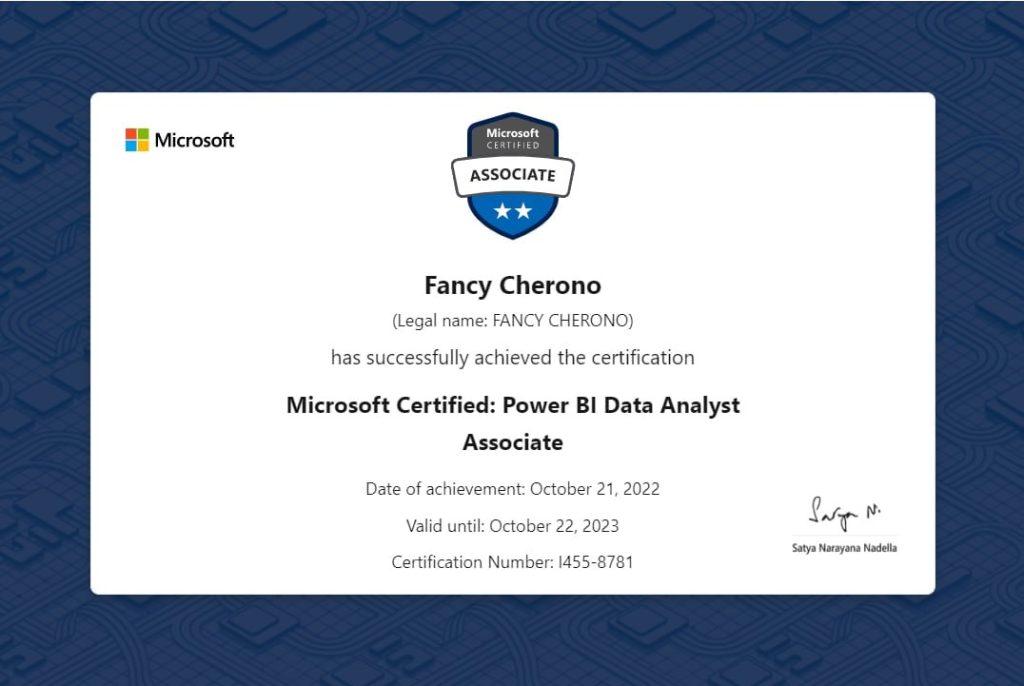
Upon successfully completing the Power BI Course, Clap academy Provides the course completion certificate for Power BI. And its validity is a lifetime.
To unlock the Clap academy Power BI course completion certificate, You must complete at least one full session and finish the course as part of your Power bI training by having a minimum score of 80% during the simulation test.
- Prepare the data (20-25%)
- Model the data (25-30%)
- Visualize the data (20-25%)
- Analyze the data (10-15%)
- Deploy and maintain deliverables (10-15%)
- Business Analysts
- Business Development Managers
- Marketing, finance, and sales professionals
This exam measures your ability to accomplish the following technical tasks: prepare the data, model the data, visualize and analyze the data, and deploy and maintain assets.
The cost of Power BI Exam PL-300: Analyzing and Visualizing Data with Microsoft Power BI is $165 USD.
The validity of Microsoft PL-300 certification is 1 year.
The validity of this Microsoft DA-100 certification is 2 years.
Students' Testimonials
What Student About Us




Hear from our learners
Like what you hear from our learners?
or, call to talk to our course counsellor
Microsoft Power BI Training FAQs
You will never miss a lecture at Clap academy! You can choose either of the two options:
- View the recorded session of the Power BI Training class available in your LMS.
- You can attend the missed session, in any other live batch.
Enroll now to attend the never miss and one of the best Power BI course class offered by Edureka.
Your access to the Support Team is for a lifetime and will be available 24/7. The team will help you in resolving queries, during, and after the Power BI certification course.
Post-enrolment to Power BI Certification Course, the LMS access will be instantly provided to you and will be available for a lifetime. You will be able to access the complete set of previous class recordings, PPTs, PDFs, and assignments. Moreover, access to our 24×7 support team will be granted instantly as well. You can start learning right away. Check out Power BI Course details now!
Yes, access to the Power BI Training course material will be available for a lifetime once you have enrolled in the course. So what are you waiting for then? Get enrolled with industries best Power BI Certification course offered by Edureka.
Power BI is a Microsoft business intelligence tool for business analytics. This tool allows users to aggregate and share data with reports, visualizations, and other analytics tools. It helps you create reports and charts for business insights. Power BI is available in Windows desktop app, online cloud-based software as a service, a report builder, a report server, a visual marketplace, and mobile apps for Windows, iOS, and Android tablets and smartphones.
Power BI is a popular choice among all business intelligence tools because it is easy to understand even for non-technical professionals. Users don’t need advanced skills in data analytics or engineering in order to use Microsoft Power BI. Edureka Power BI online course will help you to gain expertise in the Power BI Training topics that are a part of the Power BI course syllabus.
Online Power BI certification training helps you understand how it works. You will learn to build reports and dashboards, use query editor, and understand Data Modeling and data analysis expressions. Our Power BI Course content is designed to cover the complete Power BI Syllabus.
Top Indian companies using Power BI:
- Accenture
- WNS
- Hexaware Technologies
- Ernst & Young
- Capgemini
- Dell International
- Wipro BPS
- Deloitte
- Sony
- Syngene International
- Infosys BPO
- HCL Technologies
Top companies using Microsoft Power BI worldwide are:
- Rolls-Royce Holdings PLC (UK)
- Kraft Heinz Co (USA)
- Conde Nast (USA)
- Dell (USA)
- Meijer (USA)
- Hospital Montfort (Canada)
Below professionals should go for this Power BI certification exam are:
- Business Analysts
- Business Development Managers
- Marketing, finance, and sales professionals
The Power BI certification exam cost for the DA-100 exam is ₹4800 INR/$165 USD. The Power BI Exam fee may differ as per the geographical location. Edureka Power BI Certification cost in India is INR17,795.
The exam can be taken on the 28th 2022. This exam tests your ability to perform the technical tasks listed below include: preparing the data, creating models of the data; visualizing and analyzing data; and deploying and managing assets. The test is the first of its kind. This exam is replacing Examination DA100: Analyzing and analyzing Data using Microsoft PowerBI which will be retired on March 31st 2022. The exams will have the same domain of knowledge.
Power BI certification exams test your following skills:
- Prepare the data (20-25%)
- Model the data (25-30%)
- Visualize the data (20-25%)
- Analyze the data (10-15%)
- Deploy and maintain deliverables (10-15%)
Edureka provides a lot of free learning resources that enable you to learn the basic concepts of Power BI, such as:
Top companies who hire Power BI certified developers are Johnson Controls, Uline, Cushman & Wakefield, VITAS Healthcare, Tableau Software, Exelon, Microsoft, Bitam Oracle, SAS, IBM, Tibco, MicroStrategy, and GoodData.
According to Payscale, the average salary for a Business Intelligence (BI) Developer is $75,885
According to Glassdoor, the national average salary for Power BI Developers is ₹5,47,810 per year in India.
Some standard tools in Power BI are Power query, built-in connectors, Machine Learning models, AI-powered Q&A, quick insights, and integration of Cortana. The built-in connectors in Power BI enable the user to connect with On-premises and On-cloud data sources, including Salesforce, Microsoft, SQL Servers, and many more.
Power query helps to integrate the reports and share them on the internet. Cortana integration will let you run queries by providing voice commands. Power BI gives advanced analysis, Machine Learning, and other AI tools to create live dashboards and check your real-time performance.
Data modeling is one of the essential features of Power BI used to connect data from multiple sources in the BI tool using a new relationship between separate data variables.
Absolutely, earning the Power BI certification is totally worth it. It has the following benefits: Power BI is the market leader for execution and encourages analytical reasoning to create solutions. Get certified by the best Power BI training institute.
Find the cost of Power BI Course in different countries:
Countries | Power BI Certification Cost |
India | INR16,015 |
US | $449 |
Australia | $593 |
Canada | $584 |
UK | €341 |
Singapore | $611 |
UAE | $449 |
Professionals need to know the functionalities of Power BI. The most important thing is to learn Power BI. Below are the steps to help you gain knowledge and expertise in Power BI.
Step 1: Register yourself to our Microsoft Power BI certification course.
Step 2: Go through each Power BI Training topic explained by our experts and perform the task in Power BI yourself.
Step 3: Apply for the DA-100 certification exam and prepare yourself for the exam.
Step 4: Clear the certification and become a Microsoft Certified Data Analyst Associate.
A Power BI developer must have professional skills in Power BI. The certification on the DA-100 exam by Microsoft proves a person’s knowledge in Power BI.
DAX means Data Analysis Expressions is a formula expression language used throughout Microsoft Power BI and visualization tools. It’s a library of functions and operators merged to create formulas and expressions in Power BI.
The salary range for Power BI Professionals in various countries according to a salary survey by Payscale, Glassdoor, and talent.com:
Countries | Power BI Developer Highest Average Salary |
India | ₹10,01,095 per year |
US | $134,798 per year |
Australia | $234,000 per year |
Canada | $110,006 per year |
UK | £65,000 per year |
Singapore | S$69075 per year |
UAE | AED 132850 |
Power BI learners should first understand all the basic and advanced concepts. Edureka’s Power BI course is one of the best e-learning training beginners can pick to learn from scratch.
Power BI, Tableau, FusionChart, Infogram, D3, ChartBlocks, Google Charts are other Data Visualization tools popular in the market.
More than 70% of Edureka Learners have reported changes in job profile (promotion), work location (onsite), lateral transfers & new job offers. Edureka’s Power BI Certification is well recognized in the IT industry as it is a testament to the intensive and practical learning you have gone through and the real-life projects you have delivered. So what are you waiting for then? Get enroll with industries one of the best Power BI Course offered by Edureka.
Business intelligence is a good career option to pursue because it offers many job opportunities and job roles in demand in various industries and earns above-average salaries.
Power BI developers are responsible for designing and developing BI reports and providing valuable insights to help the organization make better decisions. The Power BI job role requires professionals to understand data integration, business intelligence, data modeling, data warehousing, database, and various technical side of Business intelligence tools. With this Power BI certification, professionals can learn how to perform these roles and responsibilities efficiently.
Industries that use Power BI are manufacturing, retail, insurance, healthcare, real estate, and energy utility. After completing our Power BI course, you can quickly get employment opportunities in one of these top industries.
The other BI Courses offered by Edureka are